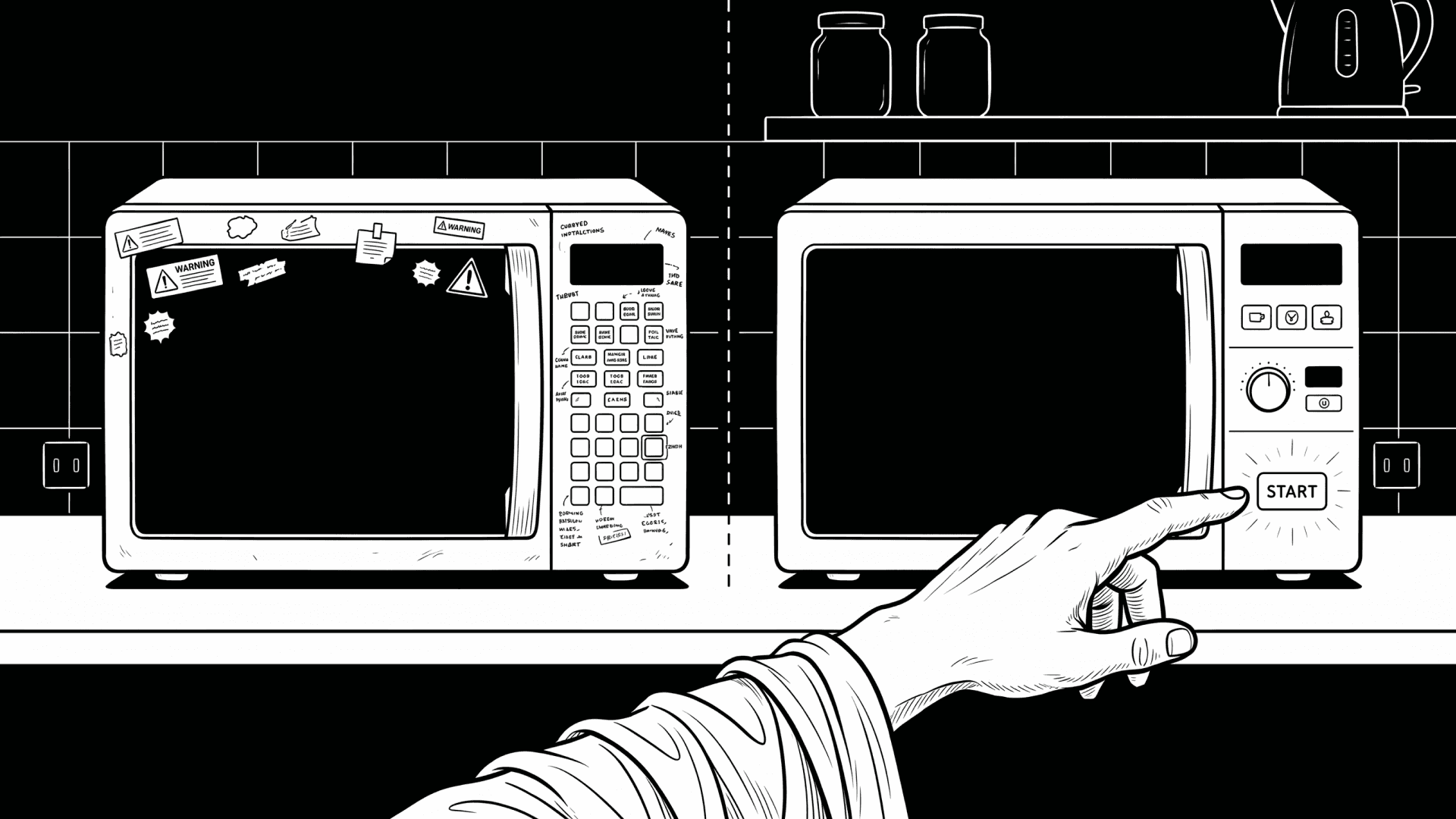
You walk up to a microwave you’ve never used before. The front is flat with a dark glass door and on the right, a tight grid of buttons with small text or icon labels. Popcorn. Power. Time Cook. Weight Defrost. Start. Stop. Now, you want to heat food for one minute but you pause wondering which button is the beginning? Is “Time Cook” a place or an action? Is “Start” it or something else's required too?
Now imagine a different microwave where the door is clearly the centre. On the right side, there are only three visible zones: one area says “What do you want to do,” another says “Adjust,” and the last says “Go.” You don’t read much. Your hand already knows where to move.
This difference matters because people don’t move through menus. They move through space. In daily real life, we don’t say “select option three.” We say “go there,” “come back,” “I’m near the end,” or “I took the wrong turn.” Menus didn't adopt this. That’s why with menu-heavy products, one wrong press makes you feel lost.
Google Maps (or any maps app) fixed this by giving shape. A map has zones and landmarks where you can see what matters without reading everything. I'm not suggesting, you add screens everywhere! I'm proposing you could use surface, shape, colour, and position to present the navigation as well.
The microwave is a perfect example because it lives in the home and is used half-asleep in the morning, distracted during cooking or meal preparations, or in a hurry. No one wants to think while using that product.
Look at the door first. The door is the main landmark with centred, dark glass, large surface. It tells you, without words, “this is the thing.” Good microwaves keep the door visually clean and the bad ones cover it with text and stickers and steal attention from the centre. Next, the handle. A vertical handle on the side pulls your hand naturally. It says “start here.” The one in our office has a hidden push-to-open button which removes that cue and makes people hunt. Then the control panel. When buttons are grouped into zones instead of grids, users make fewer mistakes. One zone for “time,” one for “power,” one for “start and stop.” Even if labels are small, the grouping and spacing does the work.
Colour helps too. A single bright “Start” button works because good feels up and forward. A red “Stop” button works because red already means block. When both buttons are the same colour and size, we hesitate.
Texture matters. A dial with a rough edge invites turning as soon as you touch it. Flat, capacitive touch buttons do not. When time control is a dial, people use it more freely. When it’s hidden behind plus and minus buttons, people overshoot or give up.
Light placement is another guide. A soft glow near the time display pulls the eye there after food is placed inside. If the light is spread evenly everywhere, nothing stands out and feels like a highway truck display. Everything cannot be important.
Sound is part of navigation too. A single short beep when time is set tells you “you’re on the right track.” Loud error beeps feel like a block or error. Repeating, warm short beeps tells you that the work is done.
Even material finish plays a role. Glossy panels reflect light and hide boundaries. Matte panels give better shapes. It has more to do with how you want users to navigate than design taste.
If you step back and draw the microwave front as a map, you can test it fast. Where does the eye land first? Where does the hand go next? What is the main road? What are side paths? Where do you return after a mistake? If you can’t answer those without reading labels, the product UX still needs work. That’s the difference.